Yes2Win Player-to-Player Trading Teaching

Step 1: Add the Recipient as a Friend
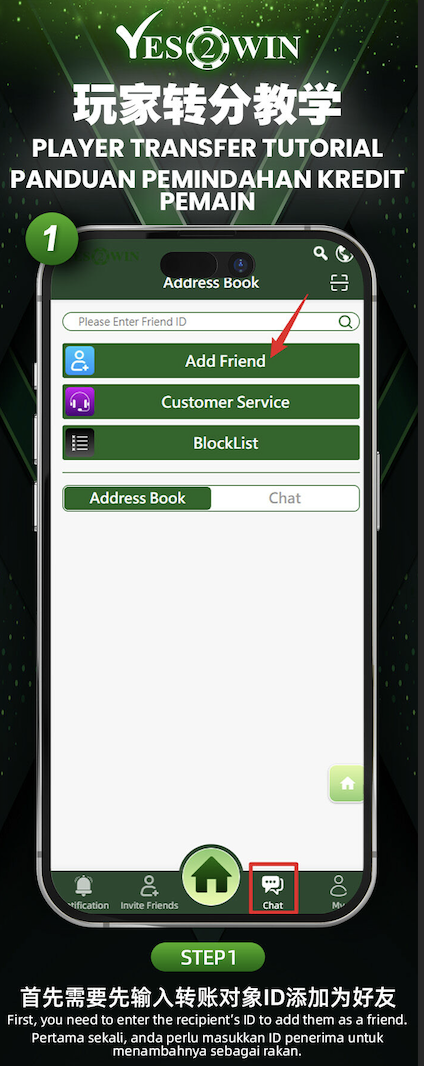
First, navigate to the "Chat" section at the bottom of the homepage. Enter the recipient’s Friend ID and click "Add Friend" to save them to your address book.
Step 2: Go to the Transfer Page
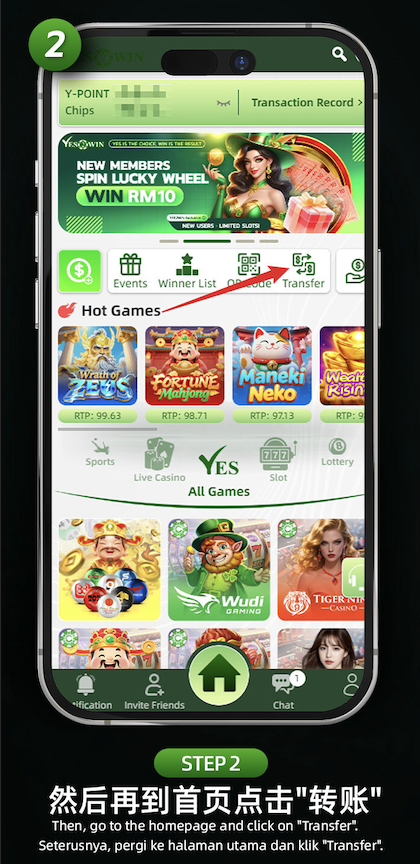
After adding your friend, return to the platform homepage and tap on the "Transfer" icon located at the top menu.
Step 3: Enter Transfer Details and Confirm
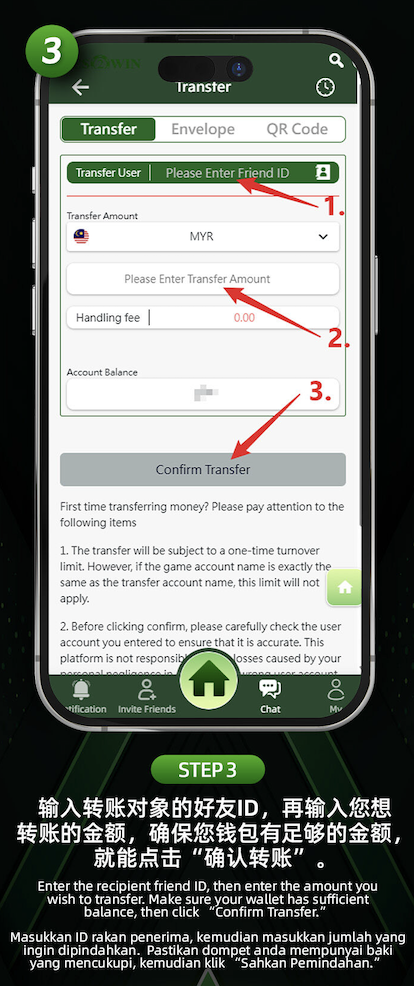
On the transfer page, enter the recipient’s Friend ID, the amount you wish to transfer, and ensure your balance is sufficient. Review the details carefully and click "Confirm Transfer" to complete the transaction.
Notes Before Transferring
Transfers are subject to a one-time turnover requirement. Ensure your transfer amount is correct as it cannot be edited once submitted. Handle transfers responsibly and verify recipient ID carefully to avoid issues.
Ready to Transfer Credits?
Log in now to your YES2WIN account on YES2WIN and send credits to your friends in just a few clicks.